Sign in
Video coming soon
What it's forEnter your JEA space. There is no password.
Steps
- Type your email address. Use the one from your registration.
- Tap Send my code.
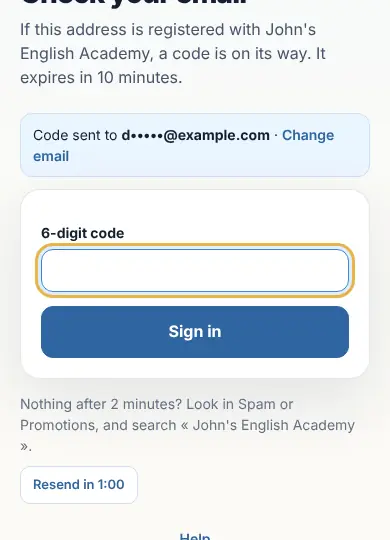
- Open your emails. You got a 6-digit code.
- Type the code in the app. Tap Sign in.
Tips
You stay signed in for 90 days on the same phone.
Add your fingerprint in More → My account. Next time, your finger is enough.
If it doesn't work
No code? Wait 2 minutes. Look in Spam or Promotions. Search « JEA ».
The code doesn't work any more? It lasts 10 minutes. Tap Send a new code.
« Your emails are blocked »? Tap Ask us for a sign-in link and send the short form. We send you a link to come in on WhatsApp (your emails are not getting through).
✉Still stuck?Write to us.