Notifications
Video coming soon
What it's forGet a message on your phone: a correction ready, an answer, a session starting.
Steps
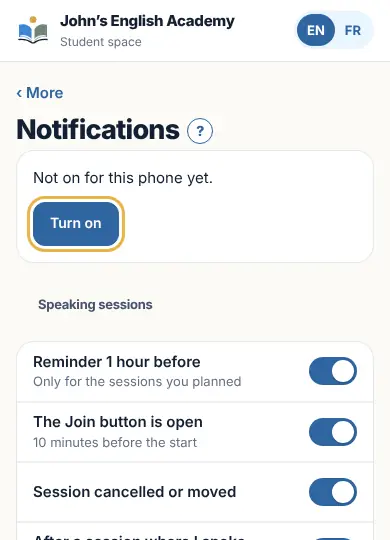
- Tap More, then Notifications.
- Tap Turn on.
- The phone asks for permission. Tap Allow.
Tips
No notifications between 21:30 and 7:00.
With a notification, you no longer get the email for the same thing.
Reminder: my planned lesson isn't done yet: 1 hour before your planned time ends, if no lesson is finished that day. You can turn it off here.
If it doesn't work
« Notifications are blocked »? Open your phone's settings. Allow notifications. Try again.
On iPhone? First install the app on the home screen.
✉Still stuck?Write to us.