Join a speaking session
Video coming soon
What it's forSpeak English live, with your group and a teacher.
Steps
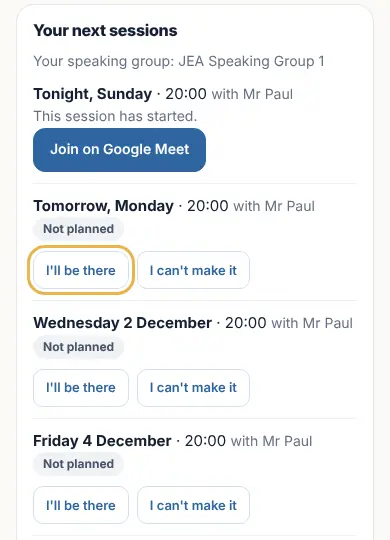
- Tap Speaking. You see your next sessions.
- For each session, tap I'll be there or I can't make it.
- On the day, the Join on Google Meet button opens 10 minutes before.
- Tap it. Google Meet opens.
- Turn on your microphone. Say hello!
Tips
Speak in every session ticked in your plan. It counts for your free days.
After the session, when your teacher notes that you spoke, you get a message of congratulations. You find it in Speaking, under Past sessions.
Use earphones. You hear better, and people hear you better.
The time is shown for your country, and in GMT+1.
If it doesn't work
The button says « Opens at… »? It opens 10 minutes before the start.
« Tonight's session is cancelled »? The next date is written just below.
The button is grey? Your access is paused. Pay your month to come back.
✉Still stuck?Write to us.